Free template · Excel and Google Sheets
Free mileage log template with the 2026 IRS rates
Write down each business trip as you drive it, and the template does the rest. It applies 72.5¢ or 76¢ a mile from the trip’s date, adds parking and tolls, and totals the year for Schedule C. It’s laid out the way the IRS expects a mileage log to look, so it doubles as your record if you’re ever asked.
Excel file (.xlsx), 85 KB. No email or sign-up. Opens in Excel and Google Sheets.
What’s in the template
- Start Here. Your vehicle, the tax year, and the odometer readings Schedule C asks for, with short instructions.
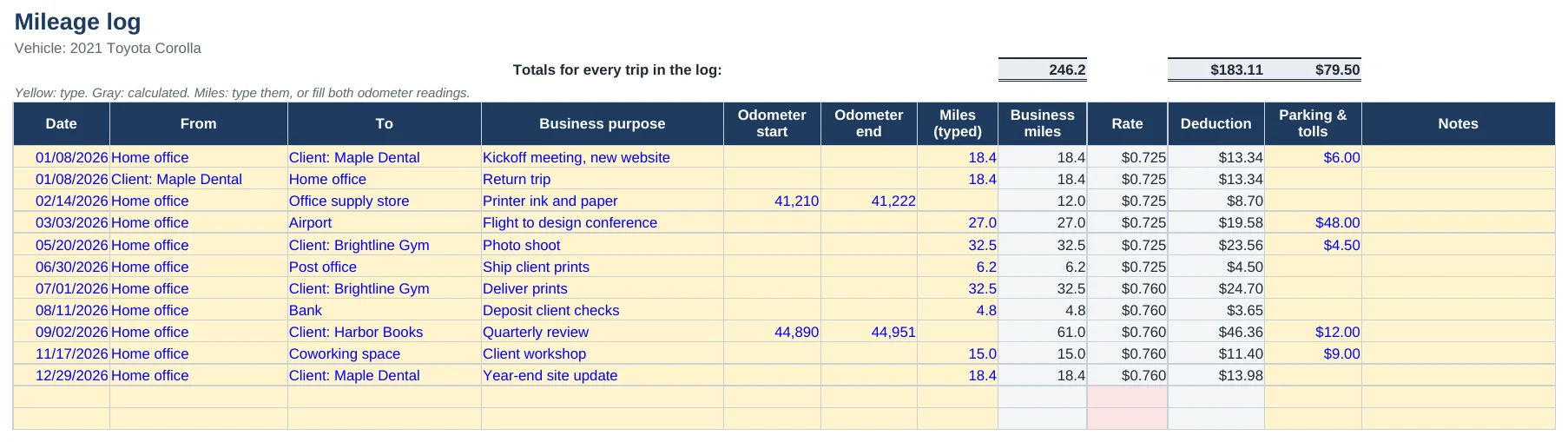
- Mileage Log. A row for each trip: date, from, to, business purpose, and the miles, typed or from two odometer readings. The rate fills in from the date: 72.5¢ a mile through June 30, 2026, 76¢ from July 1. Room for 1,000 trips.
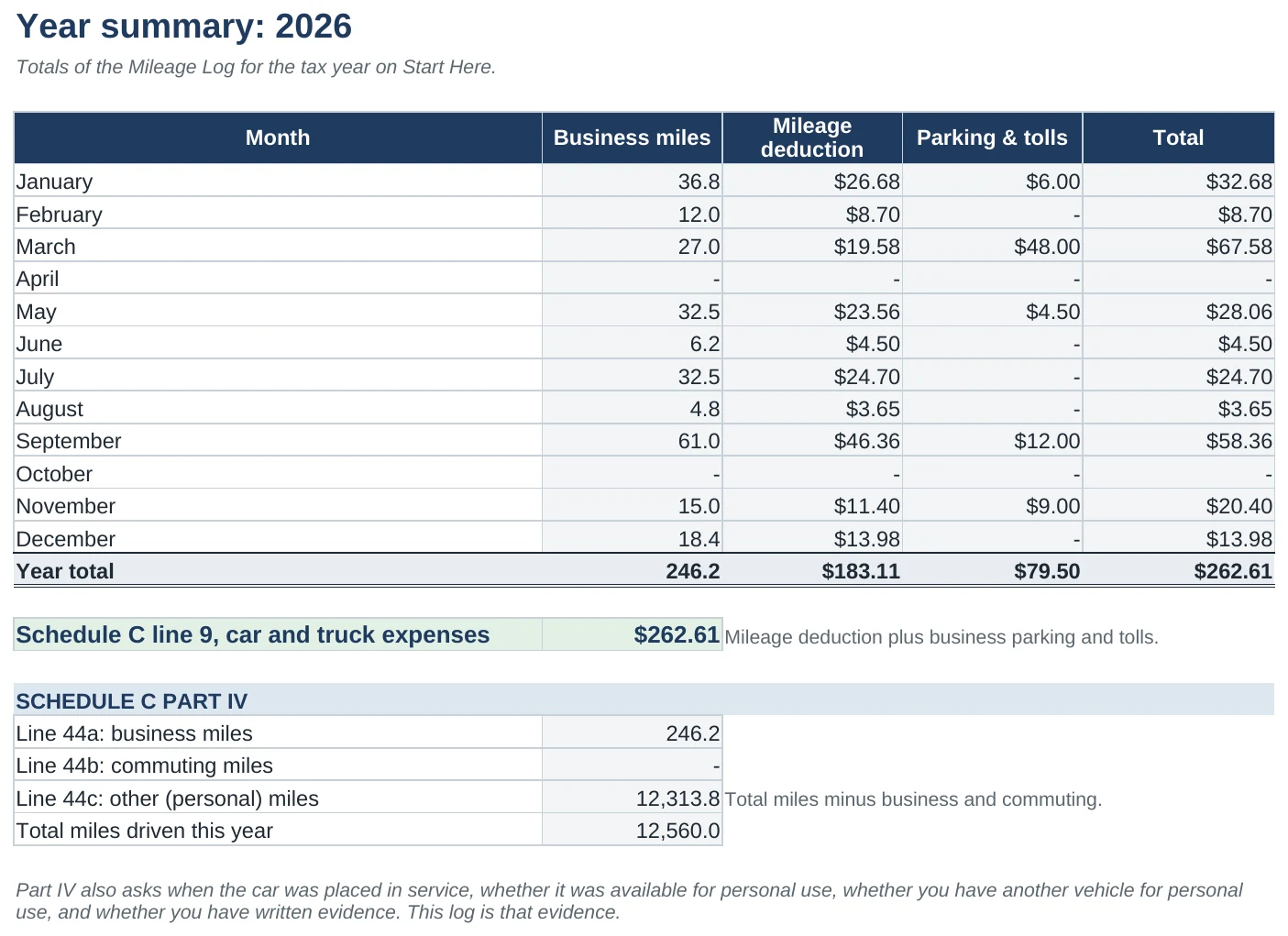
- Year Summary. Business miles, the mileage deduction, and parking and tolls for each month. Below that are the year’s total for Schedule C line 9 and the answers to the Part IV mileage questions.
- Rates. The IRS rates by start date. When the 2027 rate is announced in December, type it in the empty cell.
What the IRS wants in a mileage log
To deduct business driving, you need a record made at or near the time of each trip. A log rebuilt from memory in April is the kind the IRS throws out. For each trip, it should show:
- the date,
- where you went,
- the business purpose, such as a client meeting, a supply run or a delivery, and
- the miles driven.
Schedule C also asks, in Part IV, how many miles you drove in total that year and how many of them were business, commuting and other. That’s why the template asks for your odometer reading on January 1 and December 31.
How to fill it in
- Add your vehicle and the year on Start Here, and write down the odometer reading on January 1.
- Log each trip the day you drive it. Type the miles, or fill in the odometer at the start and end and leave Miles blank. A round trip can be one row or two.
- Put parking and tolls on the trip’s row. They’re deductible on top of the mileage rate. Gas, insurance and repairs aren’t, because the rate already covers them.
- At tax time, open Year Summary. The total is your car and truck expense for Schedule C line 9. Below it are the numbers for Part IV.
Why 2026 has two rates
The IRS raised the business rate from 72.5¢ to 76¢ a mile on July 1, 2026, so each trip has to use the rate for the day you drove it. Our guide to the IRS mileage rate explains it with an example and has a calculator if you only need the total. It also covers who can use the rate and the past rates back to 2022.
Driving is often one of the biggest deductions for gig workers and delivery drivers. Once you know your total, the free 1099 tax calculator shows what it does to your quarterly tax.
Want the rest of your books done too?
The Paid & Filed Workbook ($29) has this same date-aware mileage log built in. Paste in your bank’s CSV and it sorts every transaction onto a Schedule C line, adds your mileage, and works out your quarterly tax payments.